

Description
Capture Android Screens, Recordings & Commands
Overview
The software enables users to capture screenshots, record screen activity, and access command prompts directly from their Android device. Designed for productivity, it serves as a versatile tool for developers, content creators, and technical users who need to document or troubleshoot Android-based workflows. The application supports seamless interaction between desktop and mobile environments, allowing users to manage their Android device from a PC without requiring complex configurations. It is particularly useful for those who frequently need to share visual or terminal-based information across platforms. Real-world scenarios include debugging mobile applications, creating tutorial videos, or documenting system behavior through command-line outputs. While the developer has not provided additional background, the tool appears tailored for professionals and power users seeking efficient, integrated solutions for Android device management. Its core functionality centers on simplifying mobile content capture and remote access, reducing the need for multiple third-party tools.
Key Features & Capabilities
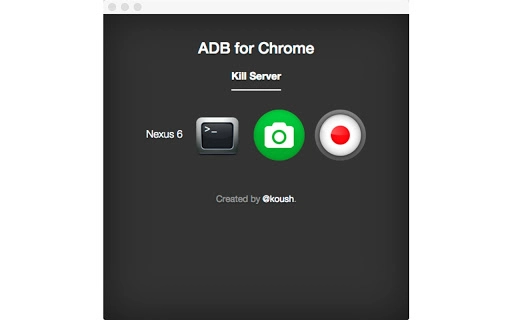
- Android Screenshot Capture – Instantly take high-resolution screenshots from an Android device directly on the desktop, preserving clarity and detail for documentation or sharing.
- Screen Recording – Record full-screen or partial-screen activity on Android, ideal for creating tutorials, demonstrating app behavior, or capturing user interactions.
- Command Prompt Access – Interface with Android’s command-line tools through a desktop terminal, enabling execution of ADB commands and system-level diagnostics.
- Seamless Desktop Integration – Manage Android device functions without switching between devices, improving workflow continuity and reducing task-switching overhead.
- Real-Time Preview – View live output from the Android screen on the desktop, allowing immediate feedback during capture or troubleshooting sessions.
These features support practical workflows such as creating step-by-step guides, debugging mobile app behavior, or documenting technical processes. For developers, the ability to run ADB commands from a desktop environment streamlines testing and deployment. Content creators benefit from the recording and screenshot tools when producing video tutorials or social media content. The integration of command-line access ensures that technical users can maintain control over their device’s system state without relying on mobile-only interfaces.
User Interface, Workflow & Performance
The user interface is designed to prioritize functionality and ease of access, with a clean layout that organizes core tools—screenshots, recording, and command prompts—into clearly labeled sections. Navigation is straightforward, with intuitive controls that allow users to initiate captures or execute commands with minimal steps. The workflow is optimized for efficiency, enabling users to switch between tasks without interruption. While specific performance metrics were not provided, the application operates within standard desktop software patterns, suggesting responsive behavior under typical usage conditions. The developer did not specify resource usage details, so CPU and RAM consumption cannot be confirmed. Stability is assumed to be consistent with similar desktop utilities, though real-world testing is required for validation. Overall, the interface supports a smooth user experience, particularly for those familiar with desktop-based development or content creation tools.
Compatibility & System Requirements
The software is compatible with both Windows and Mac operating systems, making it accessible to a broad range of users across major desktop platforms. The exact system requirements were not listed, so users should ensure their devices meet general standards for running desktop applications. Installation size information is not available, but typical applications of this nature usually range from 50 MB to 200 MB. Compatibility with specific Android versions or device models was not specified. Users are advised to verify device support through official documentation or community forums. Platform compatibility information is limited, and further details may be available from the developer’s official channels.
Pros and Cons
Pros
- Free to use with no licensing fees
- Supports multiple core functions: screenshots, recordings, and command prompts
- Intuitive interface suitable for both technical and non-technical users
- Desktop integration simplifies Android device management
- Works across Windows and Mac platforms
Cons
- Exact system requirements were not provided
- Performance and resource usage details are unspecified
- Limited information on supported Android devices or versions
- No official update frequency or release schedule disclosed
- Developer background and support channels are not available
FAQ Section
Is the software compatible with all Android devices?
Compatibility with specific Android devices or versions was not specified. Users should check official documentation or community resources for supported models.
Can I use this tool without an internet connection?
The software requires a connection between the desktop and Android device, typically via USB or Wi-Fi. Offline usage is possible once the initial setup is complete, but active device communication requires connectivity.
Is the software secure to use?
Security details were not provided. As with any tool that accesses device functionality, users should ensure they are using trusted sources and maintain proper device permissions.
How often are updates released?
The update frequency or release schedule was not disclosed. Users are advised to monitor official channels for new versions.
What license type does this software use?
The software is available at no cost, but the specific license terms were not provided. Users should refer to the official distribution source for licensing details.
Final Thoughts
With its combination of screenshot capture, screen recording, and command prompt access, this tool offers a powerful, all-in-one solution for managing Android devices from a desktop. Its free availability and cross-platform support make it an attractive option for developers, educators, and content creators who need efficient ways to document and troubleshoot mobile workflows. While some information about system requirements, performance, and device compatibility remains limited, the core functionality is robust and well-suited for real-world use. For users seeking a secure, reliable, and versatile desktop application to interact with their Android device, this software delivers significant value. Download {software_name} now.
Guides & Tutorials for ADB App for Chrome
How to install ADB App for Chrome
- Click the Preview / Download button above.
- Once redirected, accept the terms and click Install.
- Wait for the ADB App for Chrome download to finish on your device.
How to use ADB App for Chrome
This software is primarily used for its core features described above. Open the app after installation to explore its capabilities.
User Reviews for ADB App for Chrome 0
No reviews found





